Make a calculator using Javascript and CSS3
Description
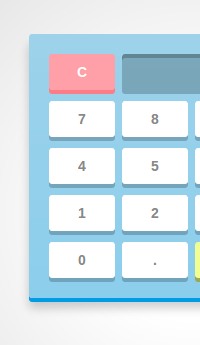
Learn to make a cool looking calculator using Javascript and CSS3.
CSS3 box shadows are used to create the 3D effect and transitions are used for the smooth press effect. Basic regex is used for validations and text replacements.
For every button(number or operator) pressed, the value is appended to an equation string displayed on the calculator screen which is later used in the JS eval function to generate the output.
61 Comments
Description


61 Comments
(close)Senthil
Amazing and artful!
hassan chihab
i like it, this is a nice work
Carlo
Awesome work, thanks for sharing! However, when downloading the calc for locally fiddling around with it, I can’t get it to work. linked up the .css and .js, but upon clicking the buttons nothing will happen. Any idea?
Sebastian
Great tutorial. Thanks SD. Small observation: there are two “type=”text/javascript” in your reference of the prefix fixer.
@Carlo did you add a proper !doctype and jQuery via CDN?
akhilesh
really awesome.. understood many concepts and saw what they did . yeah that’s some ‘kick ass’ learning.. thanks…:D
Ven
Amazing, awesome, fantastic.
elaine
Great!!
There is a bug!
if the result has a decimal, the decimal btn still can work!
ALAN
very cool….
Bala
Its awsome and idont have words to epress and its really wonderful thought
daniyyer
it can’t work on chrome 25.0.1364.152 on mac os lion,but safari is ok,is there any wrong with my chrome setting?
Mohammed
Wonderful work.
Although multiplying two negative values doesn’t seem to return a positive value. Any suggestions?
Naveen Upadhyay
Awesome creativity :)
But there is a bug in it .
you divide a number by 0 , infinity comes . now if you click on a number it concatenate with the infinity string . :P
Amrit
The code is not working for me. Any guidelines on d linking?
@Carlo did u get the bug?
ravi
the values are not visible in the text box but it works in online
Qamar Zaman
Phita moo
Zhongyue
Good work,Not to work ,who can explain it??
Lukas Bestle
Wonderful! Really amazing work.
A few issues:
- If I calculate anything resulting in “Infinity”, I can’t proceed but instead everything is appended to it
- If I press 5, then /, then 2 and then =, the result is 2.5, but I can still add a decimal point – it was included in the result
- After pressing =, any digit key or the decimal point should reset the content and not append to the result, only operators should be added
Romnel
Hey, nice work! But I encountered some problems like when I click the number or any operators it will not display on the input field can you help me with this one?
amresh
good colorfull calc.
salah
Amazingly written piece of art,,, thanks for showing a great example….
May Allah guide u to the right path
net
to make the calculator works offline, you have to put jQuery library to HTML code like this:
…
…
and put this on js file
$(document).ready(function(){
// Get all the keys from document
var keys = document.querySelectorAll(‘#calculator span’);
…
…
// prevent page jumps
e.preventDefault();
}
}
});
hope it will help you all :)
net
oh my, my jQuery example is not showing on previous comment..
i mean like this
….
<head>
<script src=”https://ajax.googleapis.com/ajax/libs/jquery/1.8.3/jquery.min.js”>
</script>
</head>
…
dhiyafaris
amaaazing!
Sylar
$(document).ready(function(){
});
shall be added in the js file
arthur
Really like it, i’ll watch it until i can recite.
AMZMA
cooool, nice smooth ui
Mukesh Kumar
It’s just so amazing. Really Prodigious work of Programming & Art. Like plust 100% +ve Feedback to the creator(s). Rectified lots of my concepts.
Asad Ali
Very nice… Well eXplained
Born Scream
To net
Thanks mann
Sergi
Awesome!
Meg
@Mohammed:
There’s no key on here for negative numbers. Adding the minus sign in front of a number doesn’t make it negative in this script.
creta
I have added $(document).ready(function()){}}); wrap around javascript code and added jquery library in html but it still does nothing, copy and pasted code from this, any ideas?
creta
Is there any specific filenames or folder structures that need to be used?
Mark D
Everything works fine in Chrome, but the layout is breaking in Firefox 25. Is something in the css incompatible?
bharat
very great.
Alok Yadav
Awesome Tuts sir..U are Great..!!
anick
Awesome!!! Thanks
CodePlayer
Gligoras Stefan
How can I make this code to play in my html file? How can I insert java script code in my html document? Thanks!
sharma chelluri
Great for new bies for the process of implementing. End to End front end technologies. Keep up the good work.
sam
add 045 and 045 and see the magic :P
Rakib Hossain
awesome
Mike Bekos
amazing coding, i just want to say that i saw a little bug. You can not multiply two minus numbers. For example -4 x -4 When you click the 2nd minus button, then the x mark is been replaced
Andreas Källberg
A better way to check for double decimals would be to use regexp on the equation instead of a flag. You could do something like:
if(btnVal == ‘.’ && inputVal.match(/.d+$/)) {
// Do nothing. Last number already has decimal point
}
This would also fix the bug with double decimal points after pressing “1/2=.”.
ibrahim
0 (Zero) is Default When 0 (Zero) Default but Not incerment
Example
Refresh 0
But not : 0000000000
The Red Hacker
awesome! thanks!!!!!!!!!
Lucas
Hi, when i click on a number, nothing is shown on screen?
Lucas
Sorry, i should add. This only occurs when i have copied the code and setup the HTML, CSS and JS on my local machine. (the website works fine) Help anyone?
Mrinal
no is not showing in calculater!!!! pls help me gyz!.
i think there is a bug..
prasanth A
realy use full for me . amazing
norma
Awesome :)
SAZZAD HOSSAIN
Awesome!!!
hassan
I can’t listen the audio while playing this code video…
any solution???
Edward
Amazing Work!!
Vubon
Thank you very much .
desihana
keren, tapi setelah saya coba ke localhost nggak jalan.
Jason
Your calculator think 3.11 – 3.10 = 0.009999999999999787
Lesson: don’t rely on a raw eval() function.
Jitendra Sisodiya
2.3 – .3 = 1.99999999999998 in your calculator
Klara
How about -12 * -3 ? doesn’t work!
Juan
No funciona cuando hago la aplicacion, el no acepta los numeros insertados
qart2003
Cool, but functions are absent. Also how to create calc for csv-table with ag functions for columns like (MIN, MAX, COUNT and so on)
oakley batwolf sunglasses cheap
Besides taking note that the jewelry you are buying is nickel free of charge, be sure to seek out the words “hypoallergenic”, “for sensitive skin” and “allergy free”.