Make a stopwatch using CSS3 without images or javascript
Description
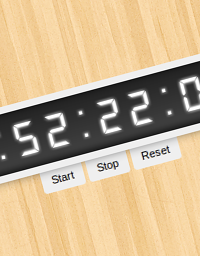
Learn to make a stopwatch in CSS3.
This tutorial focuses on step based CSS3 keyframe animation, along with the usage of the animation-play-state property to start/stop/reset the stopwatch.
The animation-play-state property may be removed because it can be replicated using other methods and is currently not supported in all browsers, but the idea behind the functionality of the stopwatch is worth learning.
The only image used is the background wood pattern(just for beautification purpose). The JS used is prefixfree - just to make the length and size of the tutorial short and easy. No images or JS are used in the stopwatch logic/display.
The code can be modified and enhanced to be used as timers, countdowns, counters, etc.
48 Comments
Description


48 Comments
(close)Shane
It does use one JS file. Cool otherwise.
vi
really cool and intelligent – both the coding and the walkthrough feature. i like!
Jared Williams
Pretty sweet
Donskelle
Awesome
Sumeet
Very intelligent and cool watch.
Well I playing with it to start and quick stop and I could manage to stop the clock at 00:00:00:171. Can anyone beat that?
Ian Tresman
Would like to see this as a countdown timer, but that would need to knowing (a) the date and time “now” (b) the destination date/time. Can CSS3 handle this?
xin
A PHP Error was encountered
Severity: Warning
Message: in_array() expects parameter 2 to be array, null given
Filename: wordpress/kses.php
Line Number: 1116
different style, different idea, different tools, bat basically the same. hope you have some dos box around for this:
http://pouet.net/prod.php?which=32210&howmanycomments=100
cheers
Eddie Staples
Awesome! Thanks for sharing.
viaria
every new post shock me. awesome.
Les
Call me old fashioned and traditional but CSS was not designed to take on the responsibilities or capabilities of what Javascript should be doing.
The problem for me is the technology boundaries are now becoming blurred somewhat.
Also when technology boundaries do become blurred the technologies individually become bloated also.
Nice effect I know but at what cost?
Rob
Awesome!!!! – You demo had made me think again about css animation
Jemin
Very cool and good looking. How can we publish the work on theCodePlayer? is it not opend to every one.
Sumeet: I beat your time mine is 00:00:00:124
TimMH
I think this could be great modified to be a count down timer. :o)
jame
awesome! :))
Ndaru
Cool.. but I tried this on IE, it does not work yet..
MrZpad
Hello, how to recover the time after stopping the timer in a PHP variable and send it to a database? thank you
Sunny
Superb, but it uses a JS file. Thanks for sharing this nice post !!
Reza
cool :D
tnx
David
Yes it used a single js file, but if you saw what the file is, you’ll realize that it has nothing to do with functionality.
A fantastic sample. Thanks
Shane
how can you use window.onload command to start the cloack automatically? could you give me the code?
UMA611
I cant get this work
DJ
This is totally awesome. However, using the code I can’t get it to work.
Eugene
Whilst looking for a JavaScript free countdown I found this image-less, JavaScript stopwatch and thought, same principal, apart from the fact that this doesn’t work without JavaScript!
Stanley M.
.timer {min-width: 360px;}
Clement
Can’t you do this with CSS counters (counter-increment and counter reset) or use the content property, to make it “full css” (except the HTML skeletton of course) ?
I may be wrong, don’t hesitate to correct me.
Martin
@Shane That’s prefix free… That just takes care of prefixes. So, no. No real JS.
gaitat
Would there be way to start, stop and reset using js code?
Thanks
Mark
Good Job Very helpful :)
Konstantin
Very nice! But one problem is linear background isn’t work right in Chrome
CssFreak
Record: 00:00:00:109
How who can beat that? Hehe…
Sherise A.
Super! On a whim I wanted to put a stopwatch timer on a wordpress blog, and realized I didn’t hove the slightest clue how. Granted there’s a bunch of countdown generators, but I actually to count up and I didn’t want a plugin wither. Now I know how..
Thanks a bunch.
Shayan
Cool, But we have less control on css3 to get the stopwatch values :
(Get Current Value Or Set To Value )
Its easier on js :P
Anyway its awesome :P
sam
Man that was kickass stuff
Russ
Dude! This is awesome! How do you think of these things????
Ashish
I’ve used this stopwatch in my project, thanks for sharing =)
supercool….
Ana Sriwahyuni
its still use javascript!
Paul
It’s wonderful
Syakir Rahman
Amazing inspiration i think!.. Thanks for share this tutorial. I will use same technique for my popup..
testors
jsut played around with clock and got 00:00:00:169.
I dont like to beat anyone just for fun, but it is fun to play around with my own fingers how fast they are at my age near of 40…
testors
again boing 00:00:00:135
believe or not but there is no chance to make a screen :(
fee
@Sumeet: Got ya! 00:00:00:167 :D
Pankaj
Hi
Giovanni
How to write any time you want to start???? any idea, thanks for your help.
countdown-timer.net
Countdown Timer Clocks eff ever been an provocative countdown-timer.net break of any event.
Numeration backwards to see how overmuch abstraction is remaining before an event increases the anxiousness of the prospect.
It would be high if you had the opportunity to create your rattling own Plug In Countdown Timer.
A plain to use cure you would bask having. By only adding
a widget you could bask the Countdown Timer Music on your protect.
http://eskidefterim.com/index.php?option=com_content
Many thanks for taking turns the following good content material on your internet site. I discovered it on google. I will check back again whenever you post additional aricles.
http://eskidefterim.com/index.php?option=com_content http://eskidefterim.com/index.php?option=com_content
http://www.you-blog.jp/blog/mk/
I have been reading out some of your articles and i ought to say good stuff. I will surely bookmark your blog.
http://www.you-blog.jp/blog/mk/ http://www.you-blog.jp/blog/mk/
http://www.gruendl.de/
Hi there, just became aware of your blog by means of Google, and located that it’s truly informative. I’ll be grateful should you continue this in future. Lots of people will benefit from your writing. Cheers!
http://www.gruendl.de/ http://www.gruendl.de/
http://www.eskidefterim.com/index.php/component/users/?view=reset
This is such a superb source that you are offering and you provide it away for free of charge. I love seeing web sites which comprehend the importance of furnishing a top quality resource for absolutely free.
http://www.eskidefterim.com/index.php/component/users/?view=reset http://www.eskidefterim.com/index.php/component/users/?view=reset