CSS3 Family Tree
Experiments
Description
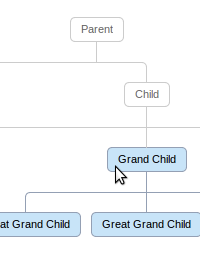
Learn to display organizational data or a family tree just using CSS, without any flash or javascript. Very simple markup - just nested lists. Pseudo elements are used to draw the connectors.
It also has hover effects - try hovering on a parent and the entire lineage will be stylized.
124 Comments
Description


124 Comments
(close)Web-Gate
Really nice !
Nick
Not bad, excellent use of code. Problem is if you wanted to use it as a family tree, you would have to find someway to show marriages, and possible other data. Still it is an excellent start to what could be a very useful library/resource.
roberto
and works for a small family tree, when you use this code for more than 4 childs doesn’t work. but this is really useful and beauty, thanks a lot.
what can i use for make this code horizontal? instead vertical?
thanks a lotttt
Ruby On Tails
@roberto
It should work for any number of children provided that the width of the container can support it. Just increase the width and it will work. Though you get horizontal a scroller then.
Ruben Cepeda
Good work.
Dennis Thrysøe
Great stuff!
Any chance this can be made to work in IE also? For example from version 8+?
The lines don’t show.
I tried adding selectivizr etc., but it dodn’t seem to help any.
Valerij Primachenko
i played with your code and wanted to share my changes
.tree li::before, .tree li::after{
content: ”;
position: absolute; top: 0;
border-top: 1px solid #ccc;
width: 50%; height: 20px;
}
.tree li::before {
left:0;
width: 50%;
border-right: 1px solid #ccc;
}
.tree li::after{
left: 50%;
border-left: 1px solid #ccc;
}
/*this way only-child still have a upper connector and do not need to be moved up*/
.tree li:only-child::after, .tree li:only-child::before {
border-top:0 none;
border-radius:0 !important;
}
.tree li:first-child::before, .tree li:last-child::after{
border: 0 none;
}
really good resource! cheers!
NacaYoda
This is nice CSS. But it is not a family tree. Not unless you’re a family of self replicating micro-organisms. It takes two to make a child (last I checked) and this very elegant tree, does not allow that to be recorded. A tree it is, sans-family.
Correct me if I’m wrong.
Ruby On Tails
@NacaYoda
Yes you are right, this is good for organizational data display but not a practical solution for a family tree. I am working on a solution to support multiple parents which will solve that issue. I hope to get that working soon in some time.
Ruby On Tails
@Dennis Thrysøe
I am working on the next version of this code which will have IE support to some extent and a feature of multiple parents.
Madhu Sudhan Adhikari
Oh Really Gud bt IE iz not support ….. What is solution for IE ?
iamseventh
This is sick. Awesome! Got to learn this thing
Glenn
This is excellent. It’s a shame there aren’t timestamps on the comments. I have no way to judge if you just started working on the multiple parents or if that comment was left a year ago. (When did you start working on that? Have a timeframe?) Great site!
Jason
I’m with Glenn, wish I knew when you were starting work on multiple parents and IE compatibility. Once those are in I think this will be great!
Nguyen Tuan Trung
How can I change the width of the tree? My tree’s big and it’s broken, unless I zoom out to make it fit in the browser. How to add the horizonal scroll?
Thanks,
Trung
Pictures
Great work. When using this as a chart for organizational data, would it be possible to enable ‘lanes’ for it? This is what I mean: not every child sits on the same (vertical) level, where the child of parent might be on the same level as the grand child of parent. Perhaps this could be done using data-attributes?
pirrmann
Thanks ! Although this may not be accurate to represent family tree, it is very nice when it comes to representing expression trees !
http://www.pirrmann.net/linq-provider-an-attempt-part-4/
JC
Any update on the update to the family tree to allow multiple parents? This is so freaking awesome..I just need to use it!
Daniel
Great work on this, thanks for sharing!
Peter
Nice, thanks for sharing! Trees rock!
Sumesh
Great work and thanks for sharing!
Please update to the family tree to allow multiple parents
Thanks
Oleg
Hi guys,
I need multiple parents and IE compatibility too. I’ve contacted the author. He didn’t have time until now to add a support for multiple parents and IE compatibility. Should we create a project on GitHub maybe to develop this great stuff on?
Regards.
23.07.12
Oleg
Also theming (support of jQuery ThemeRoller) and drag-&-drop like jQuery OrgChat http://th3silverlining.com/2011/12/01/jquery-org-chart-a-plugin-for-visualising-data-in-a-tree-like-structure/ would be great. Another feature would be “showing/hiding a particular branch of the tree by clicking on +/- icon below any parent node”.
As I already said we need a project on GitHub. What do you think?
Mangesh
If we provide the below style in place of the float:left for “li” elements – then we get the horizontal scrolling without the need of specifying the exact width for the container (eliminating the wrapping of “li” elements)
display: inline-block;
white-space: nowrap;
vertical-align: top;
However with this, there is a tiny gap left between the “li” elements – which I found in Mozilla as well as Chrome – so I put in a negative left and right margin to fix the same.
margin: 0 -2px 0 -2px;
The entire “li” element should now be styled as
.tree li {
display: inline-block;
white-space: nowrap;
vertical-align: top;
margin: 0 -2px 0 -2px;
text-align: center;
list-style-type: none;
position: relative;
padding: 20px 5px 0 5px;
transition: all 0.5s;
-webkit-transition: all 0.5s;
-moz-transition: all 0.5s;
}
Yashwant
I like the way you explain the example with live demo along with coding Its easy to understand how it is working, First time i have seen such demo
Cool :)
Thanks
Yashwant
S.M.Mousavi
Cool CSS!
I made some changes into my code like as @Mangesh and also i replaced :: with : and + with ~ and i added -o-… as -moz-… into css classes (e.g. -o-border-radius). Now it works fine on Opera, Chrome, FF.
Thanks many :)
Mike Goodstadt
Thanks for the demo.
Was using an 8 year old version of this on my site… will update.
A side note if I may…
I think there is a misunderstanding here in the comments about the display of family trees.
A Pedigree tree (your ancestors) has a simple split into 2 at each level – mother and father. So this codeplayer example works great.
A Descendants tree shows each partner as a “child” (using the term shown here in this walkthrough) from which springs the children. So again this is a good example.
These are the two core methods of visualizing graphically genealogy for analysis.
For a more holistic display of data, a more complex network is often used (Ancestry.com’s Family view) which is interesting to browse all the connections for multiple lines. Such presentational diagrams obviously require a more complicated arrangement and coding.
moslem
pause button does not work some times. and please add a stop button to stop playback and show the result. ;)
Madalin
Amazing effect, love it.
Jagannathan
How can i make it work on IE 8 and IE7 ?
Jim
Very nice.
Craig Gingell
A PHP Error was encountered
Severity: Warning
Message: in_array() expects parameter 2 to be array, null given
Filename: wordpress/kses.php
Line Number: 1116
Great resource – I’ve been using a similar approach to display family trees on my website the old way using tables, but have now updated it to use CSS3.
My version supports multiple marriages and shades males and females in blue and pink.
Take a look at an example here with over 1600 names -
http://www.gingell.com/familytree/trees.asp?id=00001&type=css3
Karan Vir Singh Sidhu
Has anyone worked out a way to get multiple parents side by side?
MD
Would it be possible to add CSS such that when you hover over any child, grand child, or great grand child element, it would highlight that element’s lineage?
Hessel
Hey Ruby,
I really like your code. Could you give us an estimation when you’re done with the ‘multiple parent’ option.
Or please just give a hint how to solve it… Did you also about divorced people, remarried and getting new children… etc?
Greetings from the Netherlands!
dave
Thanks to Ruby and commenters for all this – really helpful!
As a workaround for the marriage thing you can set up subclasses for husband and wife eg a.husb and a.wife where you set “border:none;” and remove the border radiuses on one side. Then render these as inline blocks in a div with a class eg. “marriage” where the div is styled with the border and border-radius. Result is that you have one box containing two individuals (with separate links and hovers) and the connectors flow into / out of the box with ruby’s existing css.
Sara C. Schvartzman
I have made a simple multiple parent tree starting from this example.
You can find at
http://www.gmrv.es/~sschvartzman/Sara_C._Schvartzman/multipleParent.html
with css file:
http://www.gmrv.es/~sschvartzman/Sara_C._Schvartzman/tree.css
Craig Gingell
You have to display partners BELOW the individual’s name and NOT to the side, because it won’t work for family trees where an individual is married more than once. How else will you show King Henry VIII and his SIX wives?
schoo
This is great!
Does anyone have the updated code to support multiple parents?
schoo
Sara, can you put more complex example of your code please?
E.g. with 2 grandparants, parents and child? I mean HTML code for this with use of your upgraded CSS?
Sara C. Schvartzman
You are right Craig, with my code a person can only marry 2 people. Also, it can not allow more complex examples like:
Grandparents of father, Grandparents of mother, father, mother, children.
Craig Gingell
A PHP Error was encountered
Severity: Warning
Message: in_array() expects parameter 2 to be array, null given
Filename: wordpress/kses.php
Line Number: 1116
Hi Sara, I have a solution to show both paternal and maternal grandparents in the SAME tree along with the parents and the children. It’s not yet a CSS3 solution, but you can view it on my website at -
http://www.gingell.com/familytree/?fam=00002&indi=00008
When I get time, I will post a pure CSS3 solution.
schoo
Can this tree be horiznotal? If so, does anyone knows how?
schoo
Or inverse tree, so that Parent is at the bottom?
vnkrsv
css not compatible with IE7 and earlier, please check back.
Falguni Debnath
I want to know the person who created css family tree.
If any one can say or who can develop Family Tree in css code kindly intimate me replydesk@gmail.com
oto
How would it be to do something like that?
http://www.oficinadanet.com.br/imagens/coluna/1554/gd_organograma_01.jpg
Sanket
This is just amazing!
umer
If you hate yourself than do this…it will work.
Visweshwar
The tree wouldn’t bleed if you add this to the CSS
.tree {
white-space: nowrap;
overflow: auto;
}
@Craig Gingell good catch…
Visweshwar
Also for larger trees in DIVs
tree li should have
float:none;
display:inline-block;
vertical-align:top;
in addition to
the above comment
Rick Kevin
how about that name grand child, child, parent come from a database?
i’m using a database and want to build that family tree.
how can i use it?
thank you..
gh0st
Every comment I have read is “this is nice but “Supposed to be a family tree…Not unless you’re a family of self replicating micro-organisms” — are your serious? I mean, SERIOUS?
This is some slick code, absolutely showed me what I was trying to grasp, and I totally appreciate the author for putting this up. Thank you sir from all us self replicating micro-organisms!!!
edy
Nice..
But any idea for add partner? i mean before add child, i want to add partner first, like father and mother
Thanks
Ciaran Mooney
Hey great code.
Some relationships appear broken not sure if its
the size of container or my HTML mark up,
Wat do u think, any feedback much appreciated.
Link is
http://www.mooneycallans.com/mooneyTree1.html
Craig Gingell
I gave up trying to make this work on IE8. Instead, I’m detecting IE8 (and earlier) on the server and rendering the page with a totally different template. Here’s my tree with support for multiple marriages
http://www.gingell.com/familytree/?tree=00001
Anyone trying to display an individual’s partner to the side should give up now. I have instances in my tree where some people have been married more than twice. There is no easy way to show that other than displaying partners below.
Ciaran
Hi all,
The uppermost branches of my tree are
spread wider the branches following them making
a large family tree difficult to view.
Is this norm for everybody else or is there a way
around it?
http://www.mooneycallans.com/mooneyTree2.html
Cheers
Ciaran
Chris
Great code. The best looking i have found online. Just one question. Is it hard to write this code so that the tree starts from left to right rather than top to bottom? I am not keen with css styling at all so any help would be great.
Paul d'Aoust
This demo is so beautiful it made me want to cry. Seriously — it’s so elegant and uses the natural semantic structure of lists to good effect. It doesn’t feel like a hack, which was unexpected.
Misha
Super helpful, thanks a ton!
Sunil Manandhar
Really nice work, very clean css.
Will you help me by writing css, converting tree structure in horizontal manner.
Ben Kuhl
Fantastic solution!!
Jonathan Nicholson
I have used this on my family tree site. Has anybody got it to work with IE?
Jonathan Nicholson
Have a look at my site http://www.nicholsonfamilytree.co.uk/nicholson-family-tree.asp added extra expand feature
shwan
how to make it smaller?
Nebojša
This is just amazing!
Arslan
good stuff brother…
MrNguyen
Hi everyone!
Can show tree to hovertical? if so, how?
Ahsan
Awesome …
zawaruddin
great, excellent work..
very interesting… :)
Jabon Merah
Since the admin of this web site is working, no hesitation very soon it will be renowned, due to
its feature contents.
Drewman
You’re really awesome
Isuru
This is awesome! Thanks for the code. I have a problem. I need to display it in an iPhone screen. But when I view it, the tree breaks. How can I make it responsive? What CSS rules do I have to alter?
merlin
Ok so the parents support has been added but any idea when will the code be released? or will you have to buy it?
Charmie91752
Tell me, would this code allow a client to input data on the fly without having to know code? I have a cat breeder for whom this might be a great solution for the bloodlines.
rg
This is wonderful! Any idea how to access the new multi-parent code?
Louis
Thank you, this is great!
Anil
Hi,
This is my first time here, and I see multiple parents support has been added. Would like to know when the code will be available.
Apologize if it has been answered before.
Thanks
Anil
Raghu
I did give this a shot, and my tree gets broken up though. There is enough space in the canvas for the tree to be accomodated. Any thoughts?
http://rajachan.com/genealogy.html
Mark
Is there a way to make this auto fit into one screen?
tula
Thanks! This was so useful.
vbv
Sir in my project i 1 parents have 8 child . but that not set(display) properly so wt can i do??
poorna
Great work!!
Master piece of CSS tree!!
I am pretty new to this CSS.
Can anybody help me in doing slight modification to have hover effect from BOTTOM to TOP instead of TOP to BOTTOM?
when hover “Great Grand Child” highlight all the parent elements present/connected above.
ie, Great Grand Child => Grand Child => child => Parent
Thanks a lot in advance.
poorna
Hi..
Is my question not clear or is it difficult to do?
On hover child show hover for all the parents above in top.
Thanks,
poorna
Fathurozak
Thanks very much!
poorna
Can any one please help me with hover effect????
I would want the hover effect to show all the top parents when mouse pointed to great grand child.
Thanks,
poorna
Law
Awesome code!!! What can I do to make this tree view horizontally? I’m new in this CSS.. Can anyone please help me on this? Thanks alot!!!
Pascal
Very nicely done!
Love it. I was wondering how I would have to go along to add a picture to the children on the left of the text?
Carlos Carvajal
Is very good, this help me, for more aplications put inside div overflow:auto and will be larger, thanks.
brandJess
This was very helpful for setting up an organizational chart I needed for a site I am working on. I can’t provide a link to the site as it isn’t live yet, but you can see the code at http://jsfiddle.net/brandJess/4Y6Lu/ .
I am also having a problem with getting the hover effect to work through the lineage on the actual site (hover on parent and the child li will change) – I’m not sure what is interfering with it, it works find everywhere else.
akash
can anybody make it responsive…
plz I need it…
Endre
Very nice!
José
many thank you very much is just what I was looking for
Ottavio
How could I increase the horizontal width?
Allan Ramsay from Buxton
Never understood why people just give stuff like this away for free. Some bits of the web are full of really helpful people.
Brain90
Super!.
vac
it looks fantastic and so easy. thanks!
ajay
its unique code.. i thanks to all your team with core of my heard..
Férnas
Very good.. thanks for sharing! ;)
Fabio
very good example, parabens!
But I’m racking my brain to let it in vertical mode. Does anyone have any suggestions?
Vinodh
excellent work ! gotta accept, this was brilliant !
I thought this would’nt work after 3 levels. but this is generic !
GREAT WORK.. ONCE AGAIN.. YOU ARE BRILLIANT !
Hartawan
This is great, I’m now developing my own family tree and this walkthrough help me a lot.. Anyway, I’m now trying to use the multiple parent css code, and got a little bit problem when I do hover to one of the parent it isn’t affect the spouse (only affect the child and so on), how to make the effect for the spouse?
And also when the tree width over the maximum screen width, it will wrap into the next line (not forcing for horizontal line), anyway it can be manage using css .tree{width:1000%;}
Thanks.. :)
Rajitha.G
design is very good but its not supporting in all devices
Programmer
Nice, nice, nice code!
Sanjib Karmakar
Really helpful. Great stuff! Please provide the solution for IE8 bugs
ömer
Incredible
suraj
awesome!!!
Anoop Singh
Exactly what I wanted to do great video Thanks .
Thank You so much.
MAK
owsm work. keep it up
Johne604
I really enjoy the article post. Cool. fkebkgkkceed
Gaurang Ghinaiya
Great work
i want to add left and right class in ‘a’ tag so that i will decide which child is in left and which is in righ
P.S. In My tree Parents Has only two child
paul
I have my details in a mysql database and used this perl script to complete the html page. I used the css code as shown but added
display: inline-block;
white-space: nowrap;
vertical-align: top;
margin: 0 -2px 0 -2px;
instead of
float: left;
for .tree li
#!/usr/bin/perl
use DBI;
use CGI;
print CGI::header();
my $Familyname = ‘Familyname’;#your family name here
#start of html code
print <Familyname Family Tree#your family name here
#your css file here
endmarker
$db = ‘Families’; $host = ‘localhost’; $user = ‘user’; $password = ‘password’;#your details here
# connect
$dbh = DBI->connect(“DBI:mysql:database=$db;host=$host”, $user, $password, {RaiseError => 1});
#get rid of left over table descendant1
my $sth = $dbh->prepare(“DROP TABLE IF EXISTS descendants1″);
$sth->execute();
#make a new table descendants1
my $sth = $dbh->prepare(“CREATE TABLE descendants1 (ID INT, Family VARCHAR(30), First VARCHAR(30), Born DATE, FatherID INT, MotherID INT)”);
$sth->execute();
my $sth=$dbh->prepare(“select * from family where Family = ‘$Familyname’”);#select your familyname from your database
$sth->execute();
while(my ($ID, $Familyname, $Firstname, $Birth,$Death,$FatherID,$MotherID,$PartnerID,$Comments) = $sth->fetchrow_array()) {
#insert details into table descendants1
my $sth = $dbh->prepare(“insert into descendants1(ID,Family, First, Born,FatherID,MotherID) values (‘$ID’,'$Familyname’, ‘$Firstname’, ‘$Birth’, ‘$FatherID’, ‘$MotherID’)”);
$sth->execute();
}#end while 1
my $a = “0″;
my $b = “0″;
my $y =”0″;
my $x =”0″;
my $i = “1″;
$ID[$i] = “0″;
#more html
print <
endmarker
while ($i >0){
#select_oldest {
my $sth=$dbh->prepare(“select * from descendants1 where FatherID = ‘$ID[$i]‘ or MotherID = ‘$ID[$i]‘ order by Born ASC LIMIT 1″);
$sth->execute();
#while 3
while(my ($ID, $Familyname, $Firstname, $Birth,$Death,$FatherID,$MotherID,$PartnerID,$Comments) = $sth->fetchrow_array()) {
$y = “1″;
$x = “$i”;
if ($a<$i){
#more html. If children present start a new list.
print “”;
$a++;
}
while ($a>$i){
more html, end lists(may be more than one)
print “”;
$a–;
}
#reset x
$x=”1″;
#?mysql date format
my $sth = $dbh->prepare(“SELECT DATE_FORMAT(‘$Birth’, ‘%d/%c/%Y’)”);
$sth->execute();
while(my ($Birth) = $sth->fetchrow_array()) {
#more html. fill lists
print <$Firstname $Familyname $Birth
endmarker
}
#delete selected descendant from descendants1 so they won’t be chosen again
my $sth=$dbh->prepare(“delete from descendants1 where ID = ‘$ID’”);
$sth->execute();
$i++;
$ID[$i]=$ID;
#select partner from original database
my $sth=$dbh->prepare(“select * from family where PartnerID = ‘$ID’”);
$sth->execute();
while(my ($ID, $Familyname, $Firstname, $Birth,$Death,$FatherID,$MotherID,$PartnerID,$Comments) = $sth->fetchrow_array()) {
my $sth = $dbh->prepare(“SELECT DATE_FORMAT(‘$Birth’, ‘%d/%c/%Y’)”);
$sth->execute();
while(my ($Birth) = $sth->fetchrow_array()) {
#more html. add partner with original selection
print <and$Firstname $Familyname $Birth
endmarker
}
my $sth=$dbh->prepare(“delete from descendants1 where ID = ‘$ID’”);
$sth->execute();
}
}#end while 3
if ($y == “0″){
$ID[$i]++;
}
else{
if ($x == “1″){
$x=”0″;
$ID = $ID[$i];
}
else {
$i–;
$ID = $ID[$i];
}
}
}
Hope someone finds this useful.
Jeff Rosenthal
Thanks, this is great. Just one question. Is it possible to have separate hyperlinks for separate words, all within a single “box”? That is, does each box have to be a hyperlink, or could the box just be free-flowing html text including various hyperlinks within it? (In my case I want to create a family tree with lots of details for each person, including hyperlinks to documents showing their birth certificate and so on.) Thank you.
paul
I haven’t tried what you are suggesting because the hyperlinks that I use go to an individuals page where I have all their relevant details including links to details of baptism or marriage etc.
I have added the following which then includes children with a different family name to ‘familyname’ who are still descended from the original person.
(added before the ‘delete from’ section)
my $sth=$dbh->prepare(“replace into descendants1(ID,Family, First, Born,FatherID,MotherID) select ID,Family, First, Born,FatherID,MotherID from family where FatherID =’$ID’ or MotherID = ‘$ID’”);
$sth->execute();
}#end while 7
JPT
What if the tree is to large to fit on the page? My tree just breaks below the rest of the tree. Tried white-space: nowrap; etc but without success.
paul
use the css code as shown but add
display: inline-block;
white-space: nowrap;
vertical-align: top;
margin: 0 -2px 0 -2px;
instead of
float: left;
for .tree li
This should make the page as wide as needed.
Jess
Awesome! This is just what i’ve been looknig for, a simple clean code. thanks
Avatar
Thanks for the code! You are a genius!
br_m
great visualization.Wanted to check is there any way on click of the parent hide/unhide the child
thanks
Family Tree
Very nice post. I just stumbled upon your weblog and wished to mention that I’ve really enjoyed browsing
your blog posts. After all I will be subscribing in your rss feed and
I’m hoping you write once more very soon!
Rohit
Hi…
My tree prepared but not animating(not able to change colour), can anyone help on this >?
Rohit
Hi…
My tree prepared but not animating(not able to change colour), can anyone help on this >?
Farzad Wadia
Awesome Work…………
Sangeeth
Very Nice…..Thanks